
Mobile App: Word Basket
Project Overview:
An app that effectively and efficiently helps users memorize and learn new vocabulary words through various methods. It consistently motivates learners to stay engaged and provides insights into which words users need more practice with and which words they have mastered.
Duration: 1 Month
Role: UX Designer
Responsibility: Research, Test, Design


Problem Statement
Veronica needs a way to efficiently and effectively study terms for her political and criminal justice classes because she wants to excel in her exams and be able to recall terms even after the classes are complete. We will know this to be true when Veronica consistently accesses the app and maintains a studying streak. She fills up the understood bar for each deck and uses the calendar app to plan out her studying.
Goals
Design a studying tool that effectively and efficiently help user retain terms.
Who are we designing for?

Meet Veronica!
Age: 21
Gender: Female
Education: Criminal Justice & Political Science Major
Job Title: Undergraduate Student
Goals:
-
Excel on her exams
-
Better understanding of the law
-
Create better learning habits
Needs & Motivation:
Needs
-
Flexible ways of studying to stay engaged
-
“I find it really helpful when I relate terms to things I already know.”
-
Study Five terms for 1.5 hours
Motivation
-
To get an A in her classes
-
Increase her understanding of the law
-
Be prepared for law school
Information Architecture
Task 1: Create New Flashcards
User Goal: Add/ Create Flash card
Entry Point: Home Screen
Success Criteria: Successfully added a new term to a existing or new set


Task 2: Study
User Goal: Study terms
Entry Point: Home Screen
Success Criteria: Successfully go through all the terms in a selected deck and receive stats
Low-Fidelity Wireframe
Creating a New Deck
Login/Sign Up
Home Screen
Add Card
Create New Deck


Entering Term/Definition
Add More Cards
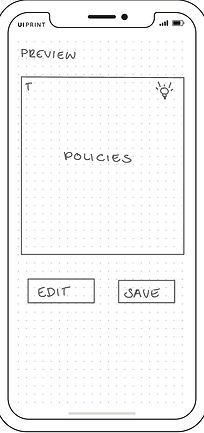
Preview
Successfully Saved



Studying With Flashcards
Home Screen
Study Screen
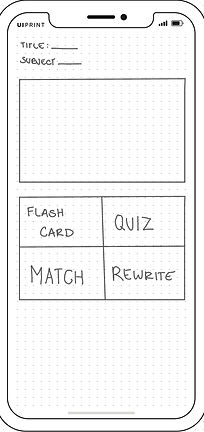
Flashcard Settings

Studying with Flashcard

Stats & Completion

Studying With Rewrite
Study Screen

Rewrite Settings

Rewrite

Completion Screen

Studying With Match
Study Screen
Match Settings

Match

Stats & Completion

Studying With Quiz
Study Screen
Quiz Settings

Quiz

Stats & Completion

Usability Testing
Scope
-
Test the usability and flow of a Vocabulary App
Metrics
-
Metric: Jakob Nielsen’s error severity rating scale.
-
0 = I don’t agree that this is a usability problem at all
-
1 = cosmetic problem only: need not be fixed unless extra time is available
-
2 = Minor usability problem: fixing this should be given low priority
-
3 = Major usability: Improve to fix, so should be given high priority
-
4 = Usability catastrophe: imperative to fix this before product can be released
Reason
-
To test how easily it is for a user to create new decks
-
To test if the studying functions are clear and easy to use
-
To test if navigating the app was difficult
Task
-
Create an account
-
Create your first deck and input new terms you want to study
-
Use the flashcard function to study an existing deck
-
Access an existing deck and use the rewrite function
Usability Test Report

User's Feedback
Icons were too small and not straightforward

Didnt know the difference between “review” and again”

Unclear what users were supposed to do

Not easily understood

Iterations
Before


After


-
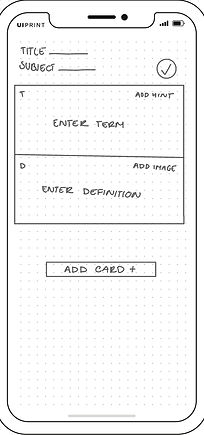
Changed check mark into a “Save” button
-
Removed lightbulb and replaced it with “add notes
-
Made the labels more specific so that the two buttons is more clearer
-
Made it straightforward where to write and added a pencil icon
-
More specific editing options have been added, and a reverse icon has been added
Next Steps
-
Start Mid-fidelity prototype
-
Conduct a second usability test to validate the changes and find other areas that need improvement
-
Work on the timer and calendar feature to flow with the app
-
Add a scanner/ upload feature to take notes and turn them into flashcards
-
Start developing UI